File:Mac OS Oni startup dialog.png: Difference between revisions
(This window appeared if you held down Shift while launching the original Carbon build of Oni for Macs, but only in the '''Classic''' Mac OS. In OS X, you would see this pared-down version which did not allow you to change your keybindings. Thus Mac OS users had one small perk that Mac OS X and Windows users did not. Since the Classic Mac OS did not have a command line, the Args field was a substitute method to specify arguments to the application. [...) |
(No difference)
|


Latest revision as of 23:42, 2 December 2025
Summary
This window appeared if you held down Shift while launching the original Carbon build of Oni for Macs, but only in the Classic Mac OS. In OS X, you would see this pared-down version which did not allow you to change your keybindings. Thus Mac OS users had one small perk that Mac OS X and Windows users did not. Since the Classic Mac OS did not have a command line, the Args field was a substitute method to specify arguments to the application.
File history
Click on a date/time to view the file as it appeared at that time.
| Date/Time | Thumbnail | Dimensions | User | Comment | |
|---|---|---|---|---|---|
| current | 23:42, 2 December 2025 | 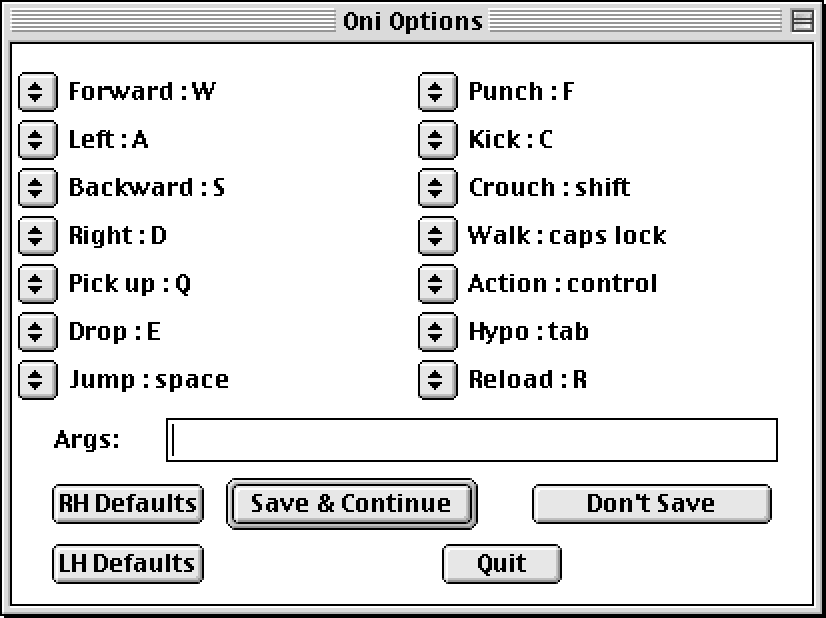 | 826 × 618 (12 KB) | Iritscen (talk | contribs) | This window appeared if you held down Shift while launching the original Carbon build of Oni for Macs, but only in the '''Classic''' Mac OS. In OS X, you would see this pared-down version which did not allow you to change your keybindings. Thus Mac OS users had one small perk that Mac OS X and Windows users did not. Since the Classic Mac OS did not have a command line, the Args field was a substitute method to specify arguments to the application. [... |
You cannot overwrite this file.
File usage
The following page uses this file:
