Talk:Modifying an existing level
This community is the manifested pain of Herodotus...
Idea
To convert an extracted ONLV into a new project file you need even more in-depth knowledge about the file structure than for simply building a level project file from scratch.
Therefore, it would be nice if we could provide a tool to automate necessary work as much as possible.
One-click operation:
- Level extraction.
- Create means to seamlessly handle Onisplit's dae files:
- Either post-edit dae files to make them compatible with Blender. (The onisplit arg -blender seems to work for character import/export only.)
- Or write an Blender addon that can directly read Onisplits dae files. Ideally, that addon should also be able to output Onisplit compatible dae files so an additional fbx roundtrip can be avoided.
- Conversion of ONLV into an actual project file.
- Recycling of physics and locklights.
- Preserving as much vertex shading as possible by preferring DAE over CJBO linked meshes.
- BSL analysis to create FILM and cut scene sections?
AE package
mods.oni2.net
 |
 +-- 08030LevelRecycler#.zip (# = Upload version)
      |
      +-- 08030LevelRecycler_Win
           |
           +-- Mod_Info.cfg
           +-- plain
                |
                +--win_only
                    |
                    +--Tools
                        |
                        +-- LevelRecycler
                             |
                             +-- icon.png (32 x 32 px)
                             +-- LevelRecycler.exe
Mod_Info.cfg
AEInstallVersion -> 2.0
NameOfMod -> Level Recycler
Creator ->
ModVersion ->
Readme ->
ExeName -> Tools/LevelRecycler/LevelRecycler.exe
WorkingDir -> Exe
IconName -> Tools/LevelRecycler/icon.png
Distribution notes
Experimenting with a new workflow:
- LevelRecycler.vbproj contains a switch
<SkipToolPublish>false</SkipToolPublish>to build a standalone executable that gets zipped together with a release package structure (as seen above) via post-build command running a bat. No additional installations of NET libraries necessary. The file size increases by 50 MB but as advantage it is usable out of the box. - Paths are adaptable for other environments through a
BuildPaths.xml. SeeBuildPaths[Dummy].xmlin project folder.
Blender detection / management
...
Startup
Oni
 |
 +-- AE
     |
     +-- Tools
     |    |
     |    +-- OniSplit.exe
     |    +-- LevelRecycler
     |         |
     |         +-- icon.png
     |         +-- LevelRecycler.exe
     |
     +-- GameDataFolder
          |
          +-- level0_Final.dat
          +-- level0_Final.raw
          +-- level1_Final.dat
          +-- level1_Final.raw
          +-- ...
          +-- IGMD
               |
               +-- BSL script folders
The "on load" event of the LevelRecycler should automatically update an overview of existing levels:
- Level0_Final.dat stores all ONLD with more meaningful level names. Map them with help of DAT file names. With those extracted files, a list for modders can be built to easily identify the level they want to recycle.
// shortened paths
OniSplit -export:ONLD* ONLD level0_Final.dat
OniSplit -extract:xml ONLD ONLD/*.oni
for each valid ONLD DAT pair
    OniSplit -export:ONLV* ONLV ....dat
OniSplit -extract:xml ONLV ONLV/*.oni
dat file name, BSL script folder, natural level name
----------------------------------------------
level1_Final.dat, ONLV<Name>, ONLD<DisplayName>
As soon as the modder has selected the preferred level, it should be a one-click operation to carry out the recycling.
Less write operations
With each onload event the ONLV and ONLD would get extracted. To reduce somewhat the amount of write operations an xml cache file could be used to feed the program's overview table. If the DAT files are older then no new extractions are done.
Blender add-ons
Import
- Blender-v5-DAE-Importer-Add-on (broken but fixable)
- At first glance, positions of individual objects from collective files like lab_furn.dae are all set to 0, 0, 0. So, until that is fixed too, we should only support Blender 4.x. As for April 2026, the latest LTS blender version is 4.5.8 which also supports drag and drop of dae. DnD was for long time an unsupported feature.
- BetterCollada (untested)
Export
GenAI wrote dae addons to import and export dae. Unexpectedly, the problem with technique tag and missing attributes seems to be go by now. The addon needs more testing to see how transparency and other features are handled.
CLI support?
To establish full modding support, blender needs to be able to load dae when called from CLI. Untested. This probably requires source code changes as we don’t simply want to call new blender instances with each import. In order to keep up full modding support one would need to always fork ans update the new blender versions.
XSI addon replacement?
The general mechanisms - for floating menus and direct value rendering on objects - must be researched first, before this can be considered.
Asset panel?
If this is also possible, there is no more reason left why Blender should not become the community’s editor.
Reviving demo level Alpha Helix?
History
When you work on a level, you need to constantly test it ingame so possible errors are caught as early as possible. For that reason the tool around Helix had a plugin-based workflow. An AE package takes much longer to install and the AEI doesn't start Oni automatically.
To not confuse novice modders with two different workflows, the new Helix should be package-based. The advantage would be that the package structure is ready from first second and interdependencies can better be dealt with during level development.
Dev notes
Checklist
Done for addon
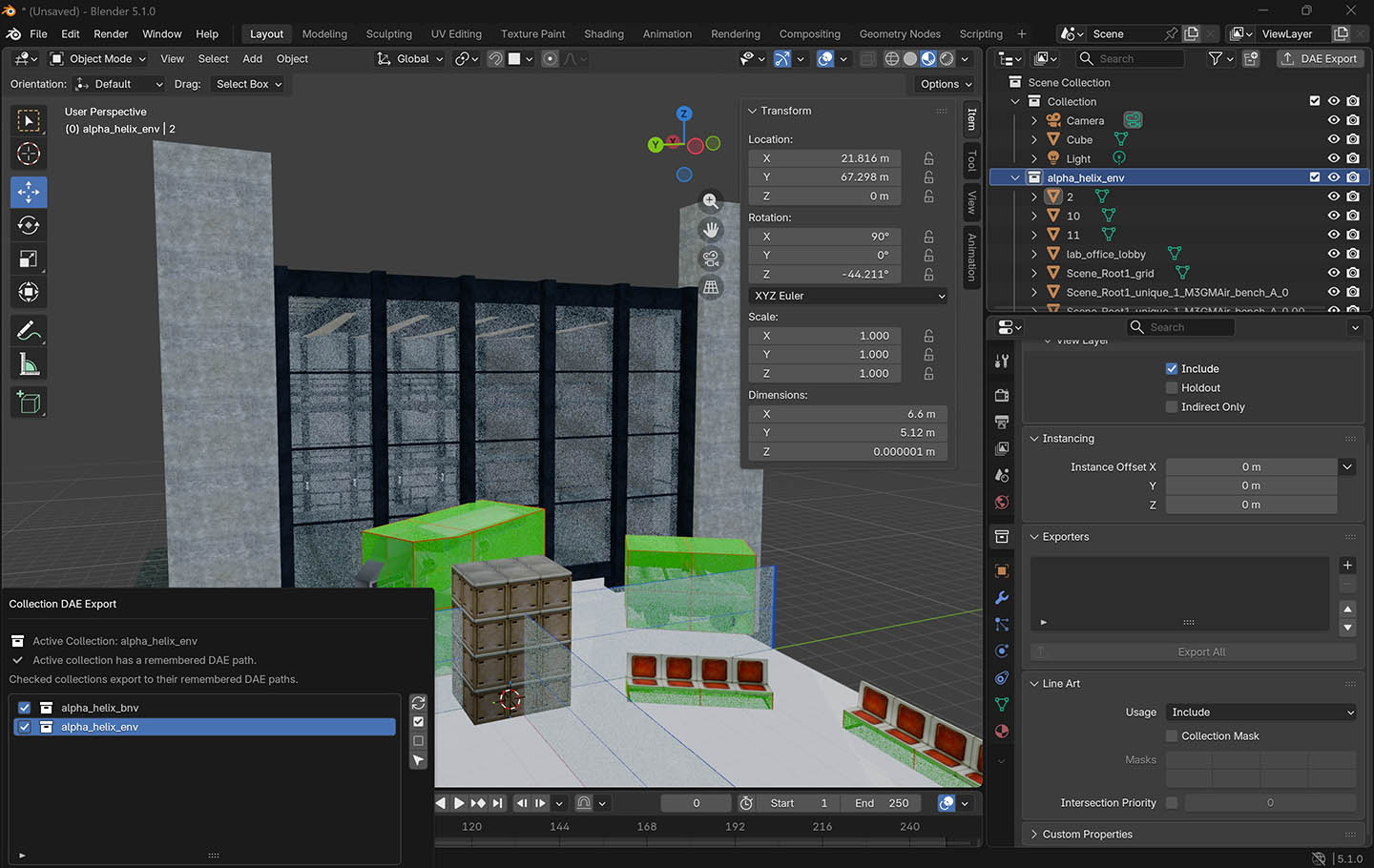
[x] changed initial addon so that individual objects inside dae won't be placed at 0, 0, 0 in Blender
[x] import dae via drag and drop
[x] exports onisplit compatible dae (<technique sid="common">)
[x] exports with adjusted world scaling and orientation (Z_UP rotates the map as Blender uses a different orientation in general)
<unit name="meter" meter="0.1"/>
<up_axis>Z_UP</up_axis>
[ ] version control, review, more testing
[ ] support dnd import of multiple files
[ ] add option to group objects during import
[ ] add dae quick save option (as floating menu or hotkey?)
[ ] add option to replace COLLISION with _marker_barrier during export and/or "on demand" (floating menu?)
[ ] import special dae on specific layer (Blender collection)
[ ] MOAR (maybe)
Scaling
Round-tripping the old helix through Blender caused an upscaling.
Old code:
<unit meter="0.1" name="decimetre"></unit>
<up_axis>Y_UP</up_axis>
New code:
<unit name="meter" meter="1"/>
<up_axis>Z_UP</up_axis>
The scaling can be reverted to normal by setting meter value.
New code:
<unit name="meter" meter="0.1"/>
World orientation and up axis
From perspective of spawned player, character looks forward if map is:
- XSI: +Z = forward, +Y = up, +X = left.
- Blender: -Y = forward, +Z = up, +X = left (set Z_up during export)
Gunk flag textures
Collision
COLLISION versus _marker_barrier
COLLISION is a material found in the shared resource collection. Based on previous tests, collision boxes seem to need an exception rule in the master file.
Onisplit's level export will output the material _marker_barrier. Its purpose is pretty much the same. But while COLLISION won't automatically gunk flag its geometry, _marker_barrier will automatically flag geometry with Transparent TwoSided Invisible NoObjectCollision NoOcclusion.
So, at some point, we could replace instances of COLLISION with _marker_barrier as a workaround: By that we avoid the necessity to write an exception rules into the level master xml for assigning gunk flags to collision.
Usage of OFGA
OFGA imports should result in uneditable proxies (changes in position and rotation allowed only) and then add exception rules so the non-collision object textures will assign NoCharacterCollision NoOcclusion.
To derive editable OFGA variants, we could create a new object class as shared resource or incorporate the new object into the AKEV core geometry. For special texture treatment, we would still need an exception rule.
The bigger idea is that every object with custom data gets treated appropriately automatically: Their features get added the the master xml or are optionally also used to build new OFGA resources.