XML:OBAN: Difference between revisions
Paradox-01 (talk | contribs) m (.. hmpf) |
m (replaced Oni Central Forum link with archive.org snapshot URL) |
||
| (57 intermediate revisions by 6 users not shown) | |||
| Line 1: | Line 1: | ||
objects use: | {{XML_File_Header | prev=Mtrl | type=OBAN | next=OFGA | name=Object Animation}} | ||
:env_setanim '' | |||
: | ==General information== | ||
: | * The XML on this page was tested with OniSplit '''v0.9.61.0''', '''v0.9.68.0''', '''v0.9.82.0''', '''v0.9.96.0'''. | ||
: | ** With v0.9.82.0, you can also convert the OBAN into a DAE file: | ||
:: "-extract:dae output src\OBANElevator.oni" exports the animation with a null node | |||
: | ::: In [[Mod_Tool#Scripting|Mod Tool]] the null node is named "unique" and holds keyframes; it can be replicated with ''activesceneroot.AddModel , "unique"'' | ||
:: "-extract:dae output src\OBANElevator.oni -geom:M3GMdebris.oni" exports animation with specified geometry | |||
: | :: "-extract:dae output src\OBANElevator.oni -geom:camera" exports animation with camera | ||
:[[ | :* With v0.9.90.0, you can convert a camera DAE to OBAN (a camera root is not supported) | ||
:: "-create:oban output src\file.dae" | |||
* [[XML:TRIG|Laser trigger]] and [[XML:DOOR|door]] files use '''global''' OBANs. | |||
* Some cutscene TRAMs, animated cutscene objects and camera shots/animations use '''level-specific''' OBANs. | |||
* If you want to update level-specific OBANs used by an ONLV, you must provide the ONLV along with the OBANs in the package. | |||
* Trivia: the [[:Image:Dream_obj_images_spawned.jpg|Dream Lab images]] use OBANs. | |||
* Tutorial: [[Authoring_custom_camera_animations|Creating camera animations]] | |||
==BSL support== | |||
{| class="wikitable" width=100% | |||
| '''Animate object''' | |||
| '''Animate character''' | |||
| '''Animate camera''' | |||
|- | |||
| valign="top" | | |||
env_setanim ''object_id oban_name'' | |||
| | |||
<nowiki>chr_animate</nowiki> [''ai_name'' | ''script_id''] ''anim_name'' [''num_frames''] [''interp_frames'']<br>chr_envanim [''ai_name'' | ''script_id''] ''anim_name'' [norotation]<br>chr_envanim_block [''ai_name'' | ''script_id''] ''anim_name'' [norotation] | |||
| valign="top" | | |||
cm_anim <nowiki>[look | move | both]</nowiki> ''oban_name'' | |||
|- | |||
| '''Animate object (range)''' | |||
| '''Stop animating character''' | |||
| '''Interpolate between current and new camera position''' | |||
|- | |||
| valign="top" | | |||
env_anim ''object_id'' [''object_id''] | |||
| | |||
chr_envanim_stop ''ai_name''<br>chr_envanim_stop ''script_id'' | |||
| valign="top" | | |||
cm_interpolate ''oban_name frame_number'' | |||
|} | |||
==XML structure== | |||
{| class="wikitable" width=100% | |||
|width=120px| '''Tag''' | |||
|width=60px| '''Type''' | |||
| '''Description''' | |||
|- | |||
| <OBAN id="0"> | |||
| | |||
| ID required. Unlike OBJC collections, this tag needs its ID attribute to be set. Since it's the first and only instance, it should be 0. | |||
|- | |||
|valign=top| <Flags> | |||
|valign=top| flag | |||
| | |||
: NormalLoop | |||
: BackToBackLoop | |||
: RandomStartFrame | |||
: Autostart | |||
:: autostart animation (after an animated object is created) | |||
: ZAxisUp | |||
:: door OBANs use this | |||
:: has Z axis pointing up | |||
:: OBAN rotations and translations are treated relatively (as changes to the door's spawn rotation/position) | |||
|- | |||
|valign=top| <InitialTransform> | |||
|valign=top| matrix4x3 | |||
| Initial position transform matrix. Last 3 values are the position in X, Y, Z. The position seem to be always {0, 0, 0} (or nearly so) in door OBANs. That would make sense because of their global use. | |||
|- | |||
| <BaseTransform> | |||
| matrix4x3 | |||
| Fixed transform matrix | |||
|- | |||
|valign=top| <FrameLength> | |||
|valign=top| int16 | |||
| fubared animation frame length (in 1/60 seconds); does not work | |||
|- | |||
| <FrameCount> | |||
| int16 | |||
| The value must be equal to the last <Time> value plus 1, because <Time>0</Time> is also a frame; Oni crashes if you use a wrong value for <FrameCount>. | |||
|- | |||
| <HalfStopFrame> | |||
| int16 | |||
| Stop frame for the first "half" of the animation; used by door animations to distinguish between open and close sequences. | |||
|- | |||
| <KeyFrames> | |||
| | |||
| Holds <OBANKeyFrame> tags. | |||
|- | |||
|valign=top| <Rotation> | |||
|valign=top| quaternion | |||
| Object rotation. (In the old days we harvested quaternions from TRAM files whereby a special version (0.9.54.0) of OniSplit was needed. Nowadays OBAN creation is fully supported by OniSplit. No more headaches.) | |||
|- | |||
| <Translation> | |||
| vector3 | |||
| {X, Y, Z} object position | |||
|- | |||
| <Time> | |||
| int32 | |||
| Elapsed time in frames; use short intervals for smooth animations. | |||
|} | |||
;Transform matrices | |||
:Like all matrices in Oni, they are composed of 3 vectors defining rotation/scaling/shearing and a 4th vector defining a translation. | |||
:In the above table, the 4 vectors are presented as rows per [[wp:Row-_and_column-major_order|Direct3D convention]], although OpenGL and Oni use them as columns. | |||
:[[wp:Transformation_matrix#Affine_transformations|Affine transformations]] use a 4x4 matrix with 4 extra coefficients (in the presentation above, one would add one column on the right): | |||
::Three [[wp:3D_projection|projection transform]] coefficients (all of them are zero here); one final coefficient (always 1.0 for an affine transform matrix). | |||
:Alternately, one can think of the 3x4 matrix as a 3x3 rotation/scaling matrix and a position vector: | |||
::*Let X=(x, y, z) be the position of a vertex in the M3GM | |||
::*Let M=(m11, m21, m31; m12, m22, m32; m13, m23, m33) be the 3x3 matrix | |||
::*Let R=(m14, m24, m34) be the translation vector | |||
::Then the absolute position of the vertex in the 3D world will be: X M + R | |||
::(left multiplication is used because of the row-major notation above) | |||
;Initial transform matrix | |||
:It is used to position the object in the environment before the animation is played. | |||
:When the animation is played, they use the fixed transform matrix and a quaternion. | |||
;Fixed transform matrix | |||
:This transformation is applied before the quaternion+position transform at every keyframe. | |||
:The only transform that can't be handled by the quaternion+position is scaling/mirroring. | |||
:Thus, the fixed transform is a scaling matrix most of the time (no rotation or translation). | |||
:In the example on the [[OBD:OBAN|OBD page]], the fixed transform scales the van up by 1.82 (along all three axes). | |||
;Quaternions | |||
:Those are used in Oni whenever interpolation of 3D rotation is involved (e.g. [[OBD_talk:TRAM/raw0x34#Quaternions|TRAM rotation]]). | |||
:In this case, the rotation in intermediate frames is interpolated from the keyframe quaternions. | |||
==XML sample== | |||
Below, '''''[...]''''' means other blocks of <OBANKeyFrame>...</OBANKeyFrame>. | |||
<?xml version="1.0" encoding="utf-8"?> | |||
<Oni> | |||
<OBAN id="0"> | |||
<Flags></Flags> | |||
<InitialTransform>1 0 0 0 1 0 0 0 1 -225 9.3 -778.5</InitialTransform> | |||
<BaseTransform>-1 0 0 0 -1 0 0 0 1 0 0 0</BaseTransform> | |||
<FrameLength>80</FrameLength> | |||
<FrameCount>'''71'''</FrameCount> | |||
<HalfStopFrame>0</HalfStopFrame> | |||
<KeyFrames> | |||
<OBANKeyFrame> | |||
<Rotation>1 1 1 1</Rotation> | |||
<Translation>-225 9.3 -778.5</Translation> | |||
<nowiki><Time>0</Time></nowiki> | |||
</OBANKeyFrame> | |||
'''''[...]''''' | |||
<OBANKeyFrame> | |||
<Rotation>1 1 1 1</Rotation> | |||
<Translation>-217 34.5 -778.5</Translation> | |||
<nowiki><Time></nowiki>'''70'''<nowiki></Time></nowiki> | |||
</OBANKeyFrame> | |||
</KeyFrames> | |||
</OBAN> | |||
</Oni> | |||
==Calculating a quaternion== | |||
An early attempt to harvest quaternions and positions from TRAM files with OniSplit [http://mods.oni2.net/node/38 v0.9.54.0] can be found [http://web.archive.org/web/20160225013043/http://oni.bungie.org/forum/viewtopic.php?id=2276 over here]. But that script runs inside an Excel file, and Excel isn't a free program, nor is the code compatible with OpenOffice. | |||
VBS code snippets for use with Mod Tool can be found here: | |||
* [[Mod_Tool/Scripting#Euler_rotation_-.3E_quaternion|Euler rotation to quaternion]] | |||
* [[Mod_Tool/Scripting#Quaternion_-.3E_Euler_rotation|quaternion to Euler rotation]] | |||
==Calculating a transform matrix== | |||
In some scenarios we need to build a new transform matrix, e.g. when making a new weapon particle emitter. The first 9 values belong to a 3x3 rotation matrix. The last 3 values are the start positions. | |||
{| style="float:right;" | |||
!Single rotation matrices | |||
|- | |||
|<math>R_x(\theta)=\begin{bmatrix} | |||
\color{Salmon}1 & \color{YellowGreen}0 & \color{CornflowerBlue}0 \\ | |||
\color{Salmon}0 & \color{YellowGreen}\cos\theta & \color{CornflowerBlue}-\sin\theta \\ | |||
\color{Salmon}0 & \color{YellowGreen}\sin\theta & \color{CornflowerBlue}\cos\theta\end{bmatrix} | |||
</math> | |||
|} | |||
x = 60 | |||
<InitialTransform><span style="background-color:#F69289">1 0 0</span> <span style="background-color:#98CC70">0 0.5 0.8660254</span> <span style="background-color:#41B0E4">0 -0.8660254 0.5</span> <font style="color:#AAAAAA">0 0 0</font></InitialTransform> | |||
<span style="background-color:#F69289">1 0 0</span> <span style="background-color:#98CC70">0 cos(x) sin(x)</span> <span style="background-color:#41B0E4">0 -sin(x) cos(x)<span> | |||
y = 60 | |||
{| style="float:right;" | |||
|- | |||
|<math>R_x(\theta)=\begin{bmatrix} | |||
\color{YellowOrange}\cos\theta & \color{SpringGreen}0 & \color{ProcessBlue}\sin\theta \\ | |||
\color{YellowOrange}0 & \color{SpringGreen}1 & \color{ProcessBlue}0 \\ | |||
\color{YellowOrange}-\sin\theta & \color{SpringGreen}0 & \color{ProcessBlue}\cos\theta\end{bmatrix} | |||
</math> | |||
|} | |||
<InitialTransform><span style="background-color:#FAA21A">0.5 0 -0.8660254</span> <span style="background-color:#C6DC67">0 1 0</span> <span style="background-color:#00B0F0">0.8660254 0 0.5</span> <font style="color:#AAAAAA">0 0 0</font></InitialTransform> | |||
<span style="background-color:#FAA21A">cos(y) 0 -sin(y)</span> <span style="background-color:#C6DC67">0 1 0</span> <span style="background-color:#00B0F0">sin(y) 0 cos(y)</span> | |||
z = 60 | |||
{| style="float:right;" | |||
|- | |||
|<math>R_x(\theta)=\begin{bmatrix} | |||
\color{OrangeRed}1 & \color{SeaGreen}0 & \color{RoyalBlue}0 \\ | |||
\color{OrangeRed}0 & \color{SeaGreen}\cos\theta & \color{RoyalBlue}-\sin\theta \\ | |||
\color{OrangeRed}0 & \color{SeaGreen}\sin\theta & \color{RoyalBlue}\cos\theta\end{bmatrix} | |||
</math> | |||
|} | |||
<InitialTransform><span style="background-color:#ED135A">0.5 0.8660254 0</span> <span style="background-color:#3FBC9D">-0.8660254 0.5 0</span> <span style="background-color:#0071BC">0 0 1</span> <font style="color:#AAAAAA">0 0 0</font></InitialTransform> | |||
<span style="background-color:#ED135A">cos(z) sin(z) 0</span> <span style="background-color:#3FBC9D">-sin(z) cos(z) 0</span> <span style="background-color:#0071BC">0 0 1</span> | |||
{| class="wikitable" style="float:right;" | |||
| | |||
[[User:Neo|Neo]] provided a little '''[http://mods.oni2.net/node/381 matrix program]'''. | |||
|} | |||
The final rotation matrix becomes calculated from multiplication of all single rotation matrices whereby the order must be Z, then Y, then X. | |||
: '''Rotation matrix Z * rotation matrix Y * Rotation matrix X''' | |||
So the transform matrix is: | |||
: '''final rotation matrix; position X; position Y; position Z''' | |||
Mod Tool VBS code (rotations only): | |||
* [[Mod_Tool/Scripting#Euler_rotation_-.3E_matrix|Euler rotation to matrix]] | |||
* [[Mod_Tool/Scripting#Matrix_-.3E_Euler_rotation|matrix to Euler rotation]] | |||
==Wish list== | |||
* TRAM import: DAE + XML. The DAE section in the XML file should have an option to create a pelvis OBAN along with the TRAM (see [[XML:TRAM]]'s RealWorld flag for details). | |||
* DAE to .oni creation should also allow for OBANs (currently OBANs can only be imported via the level's master XML file). This would be very useful for editing/creating single OBAN files if the rest of the level doesn't need changes. | |||
{{XML}} | |||
Latest revision as of 05:11, 26 December 2025
| OBAN : Object Animation | 
| |
|---|---|---|
| XML
Mtrl << Other file types >> OFGA |
General information
- The XML on this page was tested with OniSplit v0.9.61.0, v0.9.68.0, v0.9.82.0, v0.9.96.0.
- With v0.9.82.0, you can also convert the OBAN into a DAE file:
- "-extract:dae output src\OBANElevator.oni" exports the animation with a null node
- In Mod Tool the null node is named "unique" and holds keyframes; it can be replicated with activesceneroot.AddModel , "unique"
- "-extract:dae output src\OBANElevator.oni -geom:M3GMdebris.oni" exports animation with specified geometry
- "-extract:dae output src\OBANElevator.oni -geom:camera" exports animation with camera
- With v0.9.90.0, you can convert a camera DAE to OBAN (a camera root is not supported)
- "-create:oban output src\file.dae"
- "-extract:dae output src\OBANElevator.oni" exports the animation with a null node
- Laser trigger and door files use global OBANs.
- Some cutscene TRAMs, animated cutscene objects and camera shots/animations use level-specific OBANs.
- If you want to update level-specific OBANs used by an ONLV, you must provide the ONLV along with the OBANs in the package.
- Trivia: the Dream Lab images use OBANs.
- Tutorial: Creating camera animations
BSL support
| Animate object | Animate character | Animate camera |
|
env_setanim object_id oban_name |
chr_animate [ai_name | script_id] anim_name [num_frames] [interp_frames] |
cm_anim [look | move | both] oban_name |
| Animate object (range) | Stop animating character | Interpolate between current and new camera position |
|
env_anim object_id [object_id] |
chr_envanim_stop ai_name |
cm_interpolate oban_name frame_number |
XML structure
| Tag | Type | Description |
| <OBAN id="0"> | ID required. Unlike OBJC collections, this tag needs its ID attribute to be set. Since it's the first and only instance, it should be 0. | |
| <Flags> | flag |
|
| <InitialTransform> | matrix4x3 | Initial position transform matrix. Last 3 values are the position in X, Y, Z. The position seem to be always {0, 0, 0} (or nearly so) in door OBANs. That would make sense because of their global use. |
| <BaseTransform> | matrix4x3 | Fixed transform matrix |
| <FrameLength> | int16 | fubared animation frame length (in 1/60 seconds); does not work |
| <FrameCount> | int16 | The value must be equal to the last <Time> value plus 1, because <Time>0</Time> is also a frame; Oni crashes if you use a wrong value for <FrameCount>. |
| <HalfStopFrame> | int16 | Stop frame for the first "half" of the animation; used by door animations to distinguish between open and close sequences. |
| <KeyFrames> | Holds <OBANKeyFrame> tags. | |
| <Rotation> | quaternion | Object rotation. (In the old days we harvested quaternions from TRAM files whereby a special version (0.9.54.0) of OniSplit was needed. Nowadays OBAN creation is fully supported by OniSplit. No more headaches.) |
| <Translation> | vector3 | {X, Y, Z} object position |
| <Time> | int32 | Elapsed time in frames; use short intervals for smooth animations. |
- Transform matrices
- Like all matrices in Oni, they are composed of 3 vectors defining rotation/scaling/shearing and a 4th vector defining a translation.
- In the above table, the 4 vectors are presented as rows per Direct3D convention, although OpenGL and Oni use them as columns.
- Affine transformations use a 4x4 matrix with 4 extra coefficients (in the presentation above, one would add one column on the right):
- Three projection transform coefficients (all of them are zero here); one final coefficient (always 1.0 for an affine transform matrix).
- Alternately, one can think of the 3x4 matrix as a 3x3 rotation/scaling matrix and a position vector:
- Let X=(x, y, z) be the position of a vertex in the M3GM
- Let M=(m11, m21, m31; m12, m22, m32; m13, m23, m33) be the 3x3 matrix
- Let R=(m14, m24, m34) be the translation vector
- Then the absolute position of the vertex in the 3D world will be: X M + R
- (left multiplication is used because of the row-major notation above)
- Initial transform matrix
- It is used to position the object in the environment before the animation is played.
- When the animation is played, they use the fixed transform matrix and a quaternion.
- Fixed transform matrix
- This transformation is applied before the quaternion+position transform at every keyframe.
- The only transform that can't be handled by the quaternion+position is scaling/mirroring.
- Thus, the fixed transform is a scaling matrix most of the time (no rotation or translation).
- In the example on the OBD page, the fixed transform scales the van up by 1.82 (along all three axes).
- Quaternions
- Those are used in Oni whenever interpolation of 3D rotation is involved (e.g. TRAM rotation).
- In this case, the rotation in intermediate frames is interpolated from the keyframe quaternions.
XML sample
Below, [...] means other blocks of <OBANKeyFrame>...</OBANKeyFrame>.
<?xml version="1.0" encoding="utf-8"?>
<Oni>
   <OBAN id="0">
       <Flags></Flags>
       <InitialTransform>1 0 0 0 1 0 0 0 1 -225 9.3 -778.5</InitialTransform>
       <BaseTransform>-1 0 0 0 -1 0 0 0 1 0 0 0</BaseTransform>
       <FrameLength>80</FrameLength>
       <FrameCount>71</FrameCount>
       <HalfStopFrame>0</HalfStopFrame>
       <KeyFrames>
           <OBANKeyFrame>
               <Rotation>1 1 1 1</Rotation>
               <Translation>-225 9.3 -778.5</Translation>
               <Time>0</Time>
           </OBANKeyFrame>
           [...]
           <OBANKeyFrame>
               <Rotation>1 1 1 1</Rotation>
               <Translation>-217 34.5 -778.5</Translation>
               <Time>70</Time>
           </OBANKeyFrame>
       </KeyFrames>
   </OBAN>
</Oni>
Calculating a quaternion
An early attempt to harvest quaternions and positions from TRAM files with OniSplit v0.9.54.0 can be found over here. But that script runs inside an Excel file, and Excel isn't a free program, nor is the code compatible with OpenOffice.
VBS code snippets for use with Mod Tool can be found here:
Calculating a transform matrix
In some scenarios we need to build a new transform matrix, e.g. when making a new weapon particle emitter. The first 9 values belong to a 3x3 rotation matrix. The last 3 values are the start positions.
| Single rotation matrices |
|---|
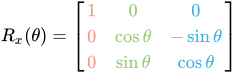
x = 60
<InitialTransform>1 0 0 0 0.5    0.8660254 0 -0.8660254 0.5    0 0 0</InitialTransform>
                  1 0 0 0 cos(x) sin(x)    0 -sin(x)    cos(x)
y = 60
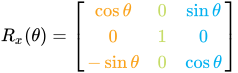
<InitialTransform>0.5    0 -0.8660254 0 1 0 0.8660254 0 0.5    0 0 0</InitialTransform>
                  cos(y) 0 -sin(y)    0 1 0 sin(y)    0 cos(y)
z = 60
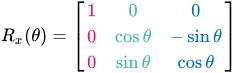

<InitialTransform>0.5    0.8660254 0 -0.8660254 0.5    0 0 0 1 0 0 0</InitialTransform>
                  cos(z) sin(z)    0 -sin(z)    cos(z) 0 0 0 1
|
Neo provided a little matrix program. |
The final rotation matrix becomes calculated from multiplication of all single rotation matrices whereby the order must be Z, then Y, then X.
- Rotation matrix Z * rotation matrix Y * Rotation matrix X
So the transform matrix is:
- final rotation matrix; position X; position Y; position Z
Mod Tool VBS code (rotations only):
Wish list
- TRAM import: DAE + XML. The DAE section in the XML file should have an option to create a pelvis OBAN along with the TRAM (see XML:TRAM's RealWorld flag for details).
- DAE to .oni creation should also allow for OBANs (currently OBANs can only be imported via the level's master XML file). This would be very useful for editing/creating single OBAN files if the rest of the level doesn't need changes.