Talk:Modifying an existing level
This community is the manifested pain of Herodotus...
Idea
To convert an extracted ONLV into a new project file you need even more in-depth knowledge about the file structure than for simply building a level project file from scratch.
Therefore, it would be nice if we could provide a tool to automate necessary work as much as possible.
One-click operation:
- Level extraction.
- Create means to seamlessly handle Onisplit's dae files:
- Either post-edit dae files to make them compatible with Blender. (The onisplit arg -blender seems to work for character import/export only.)
- Or write an Blender addon that can directly read Onisplits dae files. Ideally, that addon should also be able to output Onisplit compatible dae files so an additional fbx roundtrip can be avoided.
- Conversion of ONLV into an actual project file.
- Recycling of physics and locklights.
- Preserving as much vertex shading as possible by preferring DAE over CJBO linked meshes.
- BSL analysis to create FILM and cut scene sections?
AE package
mods.oni2.net
 |
 +-- 08030LevelRecycler#.zip (# = Upload version)
      |
      +-- 08030LevelRecycler_Win
           |
           +-- Mod_Info.cfg
           +-- plain
                |
                +--win_only
                    |
                    +--Tools
                        |
                        +-- LevelRecycler
                             |
                             +-- icon.png (32 x 32 px)
                             +-- LevelRecycler.exe
Mod_Info.cfg
AEInstallVersion -> 2.0
NameOfMod -> Level Recycler
Creator ->
ModVersion ->
Readme ->
ExeName -> Tools/LevelRecycler/LevelRecycler.exe
WorkingDir -> Exe
IconName -> Tools/LevelRecycler/icon.png
Distribution notes
Experimenting with a new workflow:
- LevelRecycler.vbproj contains a switch
<SkipToolPublish>false</SkipToolPublish>to build a standalone executable that gets zipped together with a release package structure (as seen above) via post-build command running a bat. No additional installations of NET libraries necessary. The file size increases by 50 MB but as advantage it is usable out of the box. - Paths are adaptable for other environments through a
BuildPaths.xml. SeeBuildPaths[Dummy].xmlin project folder.
Blender detection / management
...
Startup
Oni
 |
 +-- AE
     |
     +-- Tools
     |    |
     |    +-- OniSplit.exe
     |    +-- LevelRecycler
     |         |
     |         +-- icon.png
     |         +-- LevelRecycler.exe
     |
     +-- GameDataFolder
          |
          +-- level0_Final.dat
          +-- level0_Final.raw
          +-- level1_Final.dat
          +-- level1_Final.raw
          +-- ...
          +-- IGMD
               |
               +-- BSL script folders
The "on load" event of the LevelRecycler should automatically update an overview of existing levels:
- Level0_Final.dat stores all ONLD with more meaningful level names. Map them with help of DAT file names. With those extracted files, a list for modders can be built to easily identify the level they want to recycle.
// shortened paths
OniSplit -export:ONLD* ONLD level0_Final.dat
OniSplit -extract:xml ONLD ONLD/*.oni
for each valid ONLD DAT pair
    OniSplit -export:ONLV* ONLV ....dat
OniSplit -extract:xml ONLV ONLV/*.oni
dat file name, BSL script folder, natural level name
----------------------------------------------
level1_Final.dat, ONLV<Name>, ONLD<DisplayName>
As soon as the modder has selected the preferred level, it should be a one-click operation to carry out the recycling.
Less write operations
With each onload event the ONLV and ONLD would get extracted. To reduce somewhat the amount of write operations an xml cache file could be used to feed the program's overview table. If the DAT files are older then no new extractions are done.
Blender add-ons
Import
- Blender-v5-DAE-Importer-Add-on (broken but fixable)
- At first glance, positions of individual objects from collective files like lab_furn.dae are all set to 0, 0, 0. So, until that is fixed too, we should only support Blender 4.x. As for April 2026, the latest LTS blender version is 4.5.8 which also supports drag and drop of dae. DnD was for long time an unsupported feature.
- BetterCollada (untested)
Export
GenAI wrote dae addons to import and export dae. Unexpectedly, the problem with technique tag and missing attributes seems to be go by now. The addon needs more testing to see how transparency and other features are handled.
CLI support?
To establish full modding support, blender needs to be able to load dae when called from CLI. Untested. This probably requires source code changes as we don’t simply want to call new blender instances with each import. In order to keep up full modding support one would need to always fork and update the new blender versions. For convenience, the question is whether an automatic patcher can be made.
XSI addon replacement?
The general mechanisms - for floating menus and direct value rendering on objects - must be researched first, before this can be considered.
Are attachable strings possible? According to documentation, it is possible for regular objects and strings will be added to Geometry nodes in Blender 5.2.
Asset panel?
If this is also possible, there is no more reason left why Blender should not become community’s main editor.
Reviving demo level Alpha Helix?
History
When you work on a level, you need to constantly test it ingame so possible errors are caught as early as possible. For that reason the tool around Helix had a plugin-based workflow. An AE package takes much longer to install and the AEI doesn't start Oni automatically.
To not confuse novice modders with two different workflows, the new Helix should be package-based. The advantage would be that the package structure is ready from first second and interdependencies can better be dealt with during level development.
Dev notes
Checklist
Done for addon
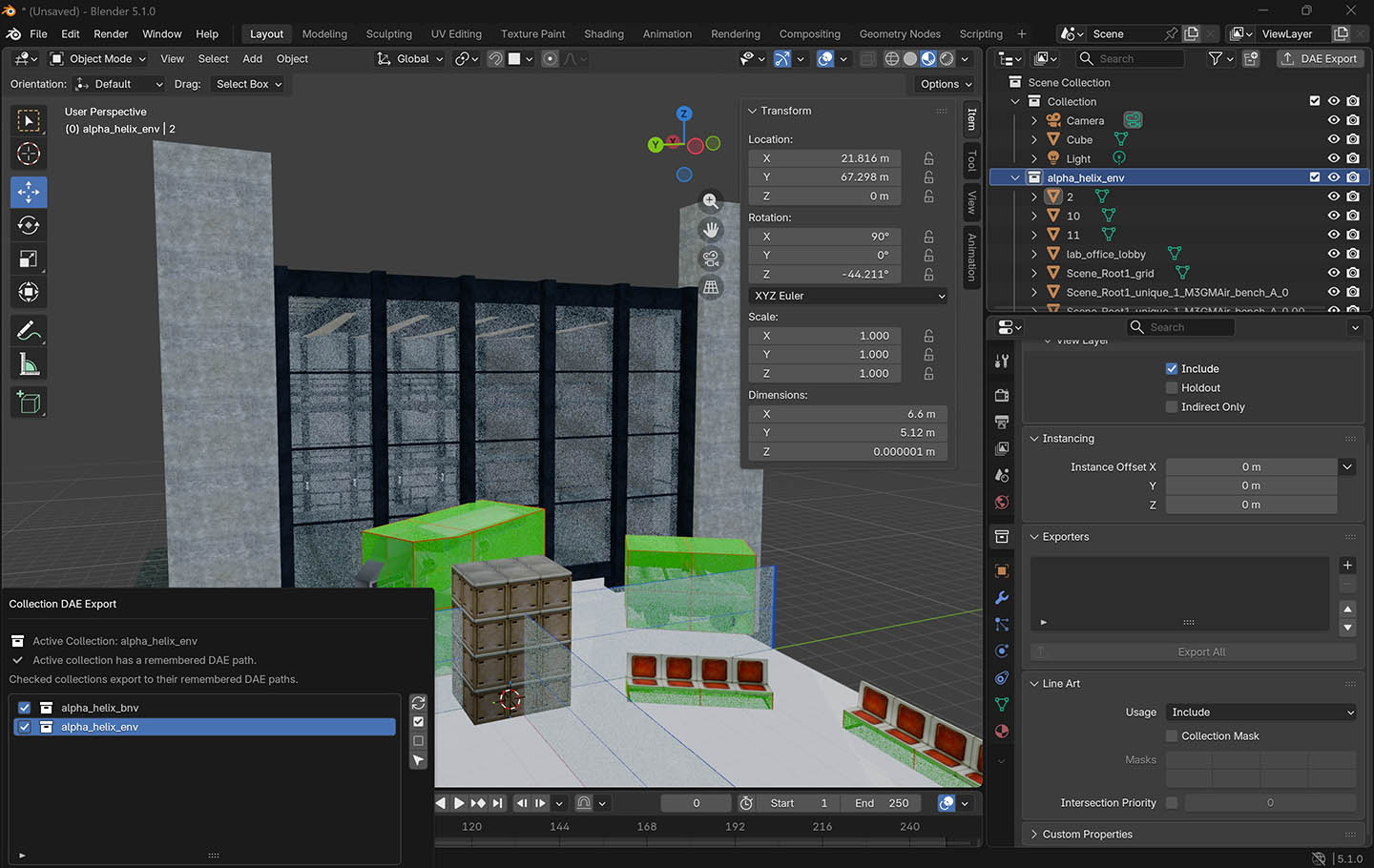
[x] changed initial addon so that individual objects inside dae won't be placed at 0, 0, 0 in Blender
[x] import dae via drag and drop
[x] exports onisplit compatible dae (<technique sid="common">)
[x] exports with adjusted world scaling and orientation (Z_UP rotates the map as Blender uses a different orientation in general)
<unit name="meter" meter="0.1"/>
<up_axis>Z_UP</up_axis>
[ ] version control, review, more testing
[ ] support dnd import of multiple files
[ ] add option to group objects during import
[ ] add dae quick save option (as floating menu or hotkey?)
[ ] add option to replace COLLISION with _marker_barrier during export and/or "on demand" (floating menu?)
[ ] import special dae on specific layer (Blender collection)
[ ] MOAR (maybe)
Scaling
Round-tripping the old helix through Blender caused an upscaling.
Old code:
<unit meter="0.1" name="decimetre"></unit>
<up_axis>Y_UP</up_axis>
New code:
<unit name="meter" meter="1"/>
<up_axis>Z_UP</up_axis>
The scaling can be reverted to normal by setting meter value.
New code:
<unit name="meter" meter="0.1"/>
World orientation and up axis
From perspective of spawned player, character looks forward if map is:
- XSI: +Z = forward, +Y = up, +X = left.
- Blender: -Y = forward, +Z = up, +X = left (set Z_up during export)
Gunk flag textures
Collision
COLLISION versus _marker_barrier
COLLISION is a material found in the shared resource collection. Based on previous tests, collision boxes seem to need an exception rule in the master file.
Onisplit's level export will output the material _marker_barrier. Its purpose is pretty much the same. But while COLLISION won't automatically gunk flag its geometry, _marker_barrier will automatically flag geometry with Transparent TwoSided Invisible NoObjectCollision NoOcclusion.
So, at some point, we could replace instances of COLLISION with _marker_barrier as a workaround: By that we avoid the necessity to write an exception rules into the level master xml for assigning gunk flags to collision.
Usage of OFGA
OFGA imports should result in uneditable proxies (changes in position and rotation allowed only) and then add exception rules so the non-collision object textures will assign NoCharacterCollision NoOcclusion.
To derive editable OFGA variants, we could create a new object class as shared resource or incorporate the new object into the AKEV core geometry. For special texture treatment, we would still need an exception rule.
The bigger idea is that every object with custom data gets treated appropriately automatically: Their features get added the the master xml or are optionally also used to build new OFGA resources.
Onisplit
Tests with original and alternative codebases
Due to former contact with Onisplit, I was curious whether the codebase could be upgraded.
As a secondary goal I might (re)implement the FILM fix described on Onisplit's talkpage.
Based on snv revision 1211, level0_Final.dat was used for export. 10 tests in a row for each version, averaged values. On 5.0 PCI-E nvme SSD.
Performance
| Program | Onisplit C# (.NET Framework 4) | Onisplit C# (.NET 10) | Onisplit VB (.NET 10) |
|---|---|---|---|
| Speed | 5.571 ms | 5.406 ms | 5.748 ms |
| Peak RAM usage | 1.155,81 MB | 150,51 MB | 63,64 MB |
Who would have thought that VB performes so well against C#. (At least for the export.) On second thought, it makes sense that both .NET 10 builds are more memory-efficient overall, as they share a more modern - and therefore more efficient - foundation.
Dev notes
On a general note:
- Do simpler fixes first, so the more complex bug might get easier to fix if a few other interdependencies are already fixed.
- In case of big pools of files with same subtype, use a limited amount of test files at once first.
- A complete dev env should contain files to test every possible conversion including options.
- Keep test data out of original AE directory. When debugging multiple codebases, you don't want them to crash into one another.
Custom bot
- Add notes about resources there. Like a downloaded Onisplit wiki page and what to expect from it. Commands and args. Be consistent using known terms, like "export" and "extract", in their proper use cases.
- Add general working instructions like for reading and writing test data.
Example of an Agent.md; for "..." use your own start path.
---
name: Oni-Ni-Kanabo
description: Agent helps in creating Oni (Bungie, 2001) game-related tools and data.
---

# Oni-Ni-Kanabo

When working with Onisplit (Onisplit.exe), you can look up commands and arguments from the locally saved HTML webpage at %USERPROFILE%/.github/agents/
Read that helpful HTML when you start.

C#-based Onisplit.exe is located at ...\OniSplit-src-net10\bin\Debug\net10.0-windows\Onisplit.exe
C#-based Onisplit source code is located at ...\OniSplit-src-net10

Read test data from ...\Oni\AE\GameDataFolder if needed, but write outputs to GitHub-ignorable subfolders of the individual's local OniSplit codebase to avoid conflicts with the source code and to keep test outputs organized and separate from source files.
Use .test-output for outputs and comparisons to reach hash-based conclusions about parity between C# and VB builds.

When conversions with this VB-based application fail, test the same command with the C#-based Onisplit.exe to check if the issue is VB-specific or shared.
If shared, then it's not a parity issue and should be fixed in both builds together. Skip (but document) shared issues for now and focus on VB-only issues.
If VB-specific, then it's a parity issue and should be fixed in the VB codebase to match the C# behavior.
Session instruction example
Followup session example. The subtypes (selection) were copied from the terminal.
Test sequential (100) stop-at-first-mismatch roundtrips with following XML subtypes (file prefixes)
Prefix Count Status   Stage File                    Reason
------ ----- ------   ----- ----                    ------
SNDD    2392 MISMATCH ONI   SNDDac1lp1.aif.oni      create exit cs=1 vb=1
TRAC      32 MISMATCH ONI   TRAMTANCOMkick_low.oni  create exit cs=0 vb=1
TRAM    2618 MISMATCH ONI   TRAMCOMCOMcomb_k.oni    create exit cs=0 vb=1
TURR      24 MISMATCH ONI   TURRmbo_turret_ciel.oni create exit cs=1 vb=1
TXCA       7 MISMATCH ONI   TXMPCOVCRATE_3.oni      create exit cs=0 vb=1
TXMP    3309 MISMATCH ONI   TXMP%3Cnone%3E.oni      create exit cs=0 vb=1
TxtC      56 MISMATCH ONI   TxtClevel_11a.oni       create exit cs=1 vb=1
See if c#-based onisplit exe/project also fails. If c# fails, skip that type. If c# pass, then analyze codebase differences, patch vb until oni-hash-parrity is reached, coninue with next subtype.
Notes on C# (.NET Framework 4) (Onisplit 0.9.99.0)
Looks like the current OniSplit source on svn has a bug in XML/ParticleXmlImporter.cs
           // broken: string text = xml.ReadElementContentAsString();
           string text = xml.ReadContentAsString();
Double checked: Testing roundtrip with shipped 0.9.95.0 and local build of 0.9.99.0
95: pass
99: fail
Applied fix in C# .NET 10 build:
99+: pass
Notes on C# (.NET 10)
The idea was (and is) to translate the v0.9.99-codebase from C# to vb, but as minior bugs linger in v0.9.99 that route builds also mental load, permanent doubts that there could be something wrong which then affects the vb codebase as well. As for traslating the v0.9.95-codebase, you are permanently concerned that it will miss new features introduced in v0.9.99.
New fixes for 0.9.99:
- XML was first exported with slightly less accuracy: Floats are rounded to 6 instead of 7 digits after the decimal separator. The desired behavior was reimplemented by adding methods that mimic this quasi-legacy float-parsing.
- TRAM needs double checking.
Notes on VB (.NET 10)
Fixing the vb codebase in its entireness might take two weeks and one addional week for heavy testing.
Things that already work:
- DAT export for oni files
- XML extraction
- Tested: DAE co-extraction for objects
- Not tested: DAE co-extraction characters / anims
- Image extraction: DDS, PNG, TGA
- Object extraction: DAE and OBJ
- WAV extraction
- TXT extraction
- SUBT creation
- Explicitly tested XML roundtripping and fixed:
- M3GM (not created from OBJ)
- BINA
XML imports needs a better test setup because of all the subformats.